The names, treatments and problems used in these screens are fictional. Any similarity to real people living or not is purely a coincidence.
Click on each image for more details on each project
AspartoftheDeviceWorksteam,wedesigned“ProofofConcept”applicationsthatcouldparseanddisplaydatafrom almostanyhospitaldeviceorelectronichealthrecord,thendisplayitinmultipleenvironmentsdemonstratinghow clinicianscouldtreatpatientsremotely.Theseearlyprototypeshelpedlaunchseveralinitiativesnowcommonina healthcare facility including a patient registration solution for their onsite clinic.
Business Plan Presentation
Patient Portal PowerPoint
WhileworkingasaUX/UIdesignerandVisualDesigneratCerner,Iwasasked to work on many Graphic / Visual Design projects. Here are just a few samples.
Style Guide Landing Page
Click Icon to open PDF Prototype in browser
Click on Image to Enlarge
Mobile Healthcare Solutions
Visual Design Projects
Click Icon to open PDF PowerPoint in browser
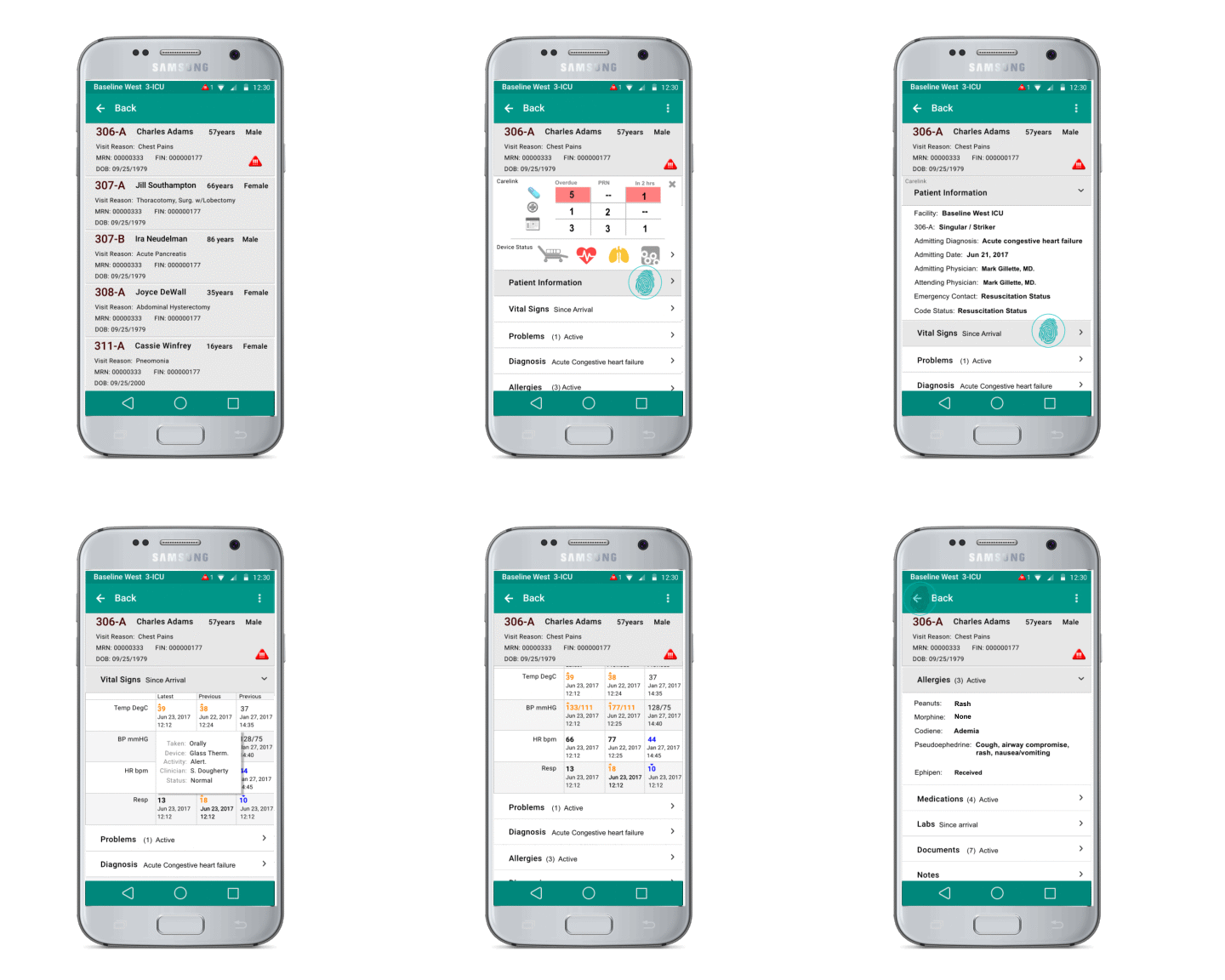
This Early Prototype demonstrates how a clinician can observe a patient directly from an app on their Android phone by connecting directly to hospital devices. The requirement was to use existing desktop and mobile functionality re-designed into an Android interface. This workflow shows: •Extended patient list with real-time alert symbols.•Selecting a patient from the patient list opens the CareLink dashboard initially.•Due and overdue display for meds and treatments.•Displays device alerts such as bed positioning and vitals.•Clicking on data cells can bring up secondary granular data.
Initial Mobile Device Interface These screenshots were part of an initial proof of concept that I used for a basic user journey / process map.
Android CareLink Mobile App:
Click on image to enlarge
Rash
None
Simplified Low level process flow
This was an early patient visit solution designed for Cerner’s on-site clinic. Although these are now very common in Physician’s offices, at the time, this was the first proposed application to sign in, scan or view your insurance documents/card, view certain medical records and history, and medical information.
Click on images to enlarge
Electronic Patient Registration
The names, treatments and problems used in these screens are fictional. Any similarity to real people living or not is purely a coincidence.
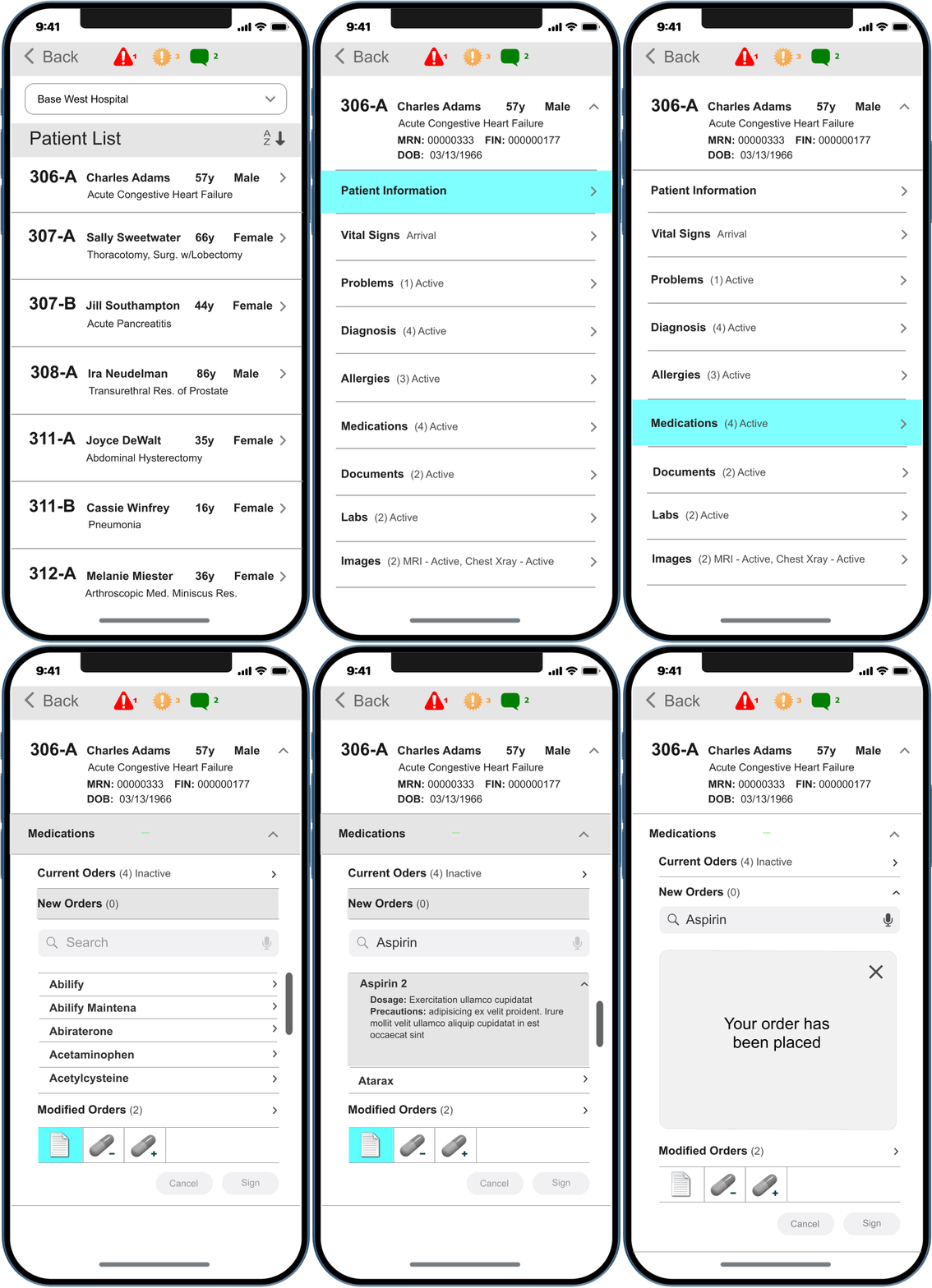
IPhone CareLink Mobile Orders
•Small sample of process Flow to submit order•Alerts•Patient List•Check vitals•Medications
This Early Prototype demonstrates how a clinician can observe a patient directly from the CareLink app on their phone. This sample workflow simulates a physician checking the patient list, selecting a patient, checking up to the minute patient information including alerts and vital signs, then checking medications, then creating a new medication order to submit and filled by connected hospital clinician. This application was originally designed for iPhone version 6 (shown Below), then updated for iPhone 8 and above.
Click on each screen to enlarge
Low Level User Flow
MyStation
Patient Engagement User Interface Design
Another Visual Design Project I was asked to design was a series of screens for Cerner’s “MyStation” Patient engagement initiative. These screens were designed to be displayed on large HD flat screen TV’s from the patient’s Bed (Approx. 10 ft.) and controlled using the hand
held remote. The original idea was to create two separate themes, one for adults and one for children. The Childrens version is shown below. You could watch TV, movies, play games, surf the internet, view your treatment schedule, wellness goals, order meals, and much more